
Easee Access8.9.41.10583 - Download
You'll be able to download in few seconds.
Publisher Description
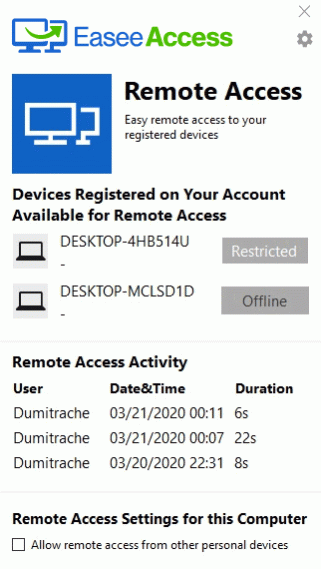
Have you ever wondered how you can work remote, but having all the conditions from work?
EaseeAccess is a software which allows you to access any computer you want from distance and use it as if it was in front of you.
All you need to do is to download and install the app on your computer or laptop, create an account, then install it on another device and log in with the same user and password that you created when you firstly installed the software. After following this procedures, you can access and control both computers from a single one, no matter where you are.
EaseeAccess serve as desktop sharing, remote control, online meetings or file transfer. The software is highly recommended for people who work a lot from home, family members who dont know how to manage all the information from their devices or have a technical issue and they need someone who know how to fix it.
Sometimes, you may need to access two or more computers at the same time. Maybe it is your work computer or the old computer from your parents house, maybe you forgot to do something at work and you would like to solve the problem over the weekend, or maybe you want to save an old file from your childhood. Even if you only want to fulfil an unfinished task or there is a personal purpose, you will get everything done by downloading EaseeAccess app. This tool will keep you connected to all your devices and control everything from halfway around the world.
About Easee Access
This Remote Computing program is available in English. It was last updated on 29 September, 2026. Easee Access is compatible with the following operating systems: Windows, Windows-mobile.
The company that develops Easee Access is Startech Alliance. The latest version released by its developer is 8.9.41.10583.
The download we have available for Easee Access has a file size of 4.2 MB. Just click the green Download button above to start the downloading process. The program is listed on our website since 2020-05-27 and was downloaded 0 times. We have already checked if the download link is safe, however for your own protection we recommend that you scan the downloaded software with your antivirus. Your antivirus may detect the Easee Access as malware if the download link is broken.
How to install Easee Access on your Windows device:
- Click on the Download button on our website. This will start the download from the website of the developer.
- Once the Easee Access is downloaded click on it to start the setup process (assuming you are on a desktop computer).
- When the installation is finished you should be able to see and run the program.
Program Details
System requirements
Download information
Pricing
Version History
version 8.9.41.10583
posted on 2020-05-27
If you end up using it for a week or a month you get the fixed period pricing starting as low as 3.99$/week or 9.99$/month
Free to install, free for 30 day of usage
And you dont pay if you dont use it (there is no reason not to have it in)
version 8.9.41.10583
posted on 2020-03-31
Disclaimer
External Download
We do not host Easee Access on our servers. We did not scan it for viruses, adware, spyware or other type of malware. This app is hosted by the software publisher and passed their terms and conditions to be listed there. We recommend caution when installing it.
The external download link for Easee Access is provided to you by apps112.com without any warranties, representations or guarantees of any kind, so access it at your own risk.
If you have questions regarding this particular app contact the publisher directly. For questions about the functionalities of apps112.com contact us.
